Free & open source v1.2.4
Run parallel Claude Code agents. Stay in control.
Codex, Cursor and OpenCode too. One git worktree each, one window for all of them.
Foreman is a free, open-source desktop app for macOS and Windows that runs AI coding agents in parallel. Claude Code, Codex, Cursor and OpenCode each work in their own git worktree on their own branch, while you review diffs, answer questions and open pull requests from one window.
macOS & Windows Apache-2.0 No account No telemetry upload
- osaka
fix-login-redirectWorking- YouThe login page loops after sign-in. Fix it.
- Read
src/auth/login.ts - Search
"returnTo"4 matches - The form never sends returnTo, so the server always redirects to /.
- Edit
src/auth/login.ts+6 −2
Claude Code+6 −24m 12s - lisbon
add-rate-limitCompleted- Adding a sliding window, swept once a minute.
- Edit
src/api/rateLimit.ts+36 −0 - Edit
src/api/middleware.ts+3 −1 - Run
npm test -- api27 passed - Edit
AGENTS.md+2 −7 - Retry-After is at least 1. Noted where the limit lives in AGENTS.md.
Completed·3 files +41 −8
Codex+41 −85m 41s - kyoto
changelog-2.4Needs you- YouWrite the changelog for 2.4.
- Run
git log --oneline v2.3..HEAD23 commits - Grouping the changes by area: auth, billing, API.
- Edit
CHANGELOG.md+41 −0 - Run
git commit -m "Changelog for 2.4"1 commit
Needs you·PushPush 1 commit to origin
Leaves this computer Pushes
changelog-2.4to github.com/acme/atlas as you. It can’t be undone from here.Claude Code+41 −08m 38s - lima
drop-momentWorking- YouReplace moment with date-fns.
- Search
"moment("12 files - Swapping moment for date-fns, one module at a time.
- Edit
src/utils/date.ts+22 −31
Cursor+22 −311m 37s - oslo
flaky-checkout-testWorking- YouThe checkout test is flaky. Find out why.
- Run
npm test -- checkout1 failed - Read
tests/checkout.spec.ts - The test waits on a fixed 200 ms timer. Switching it to waitFor.
OpenCode2m 43s - quito
remove-v1-sessionWorking- YouRemove /v1/session if nothing uses it.
- Read
src/api/routes.ts - Search
"/v1/session"0 callers
Claude Code41s
- Working
- Needs you
- Completed
A simulation of Foreman’s Tiles view. Answer a tile and its agent carries on.
01 Isolation
Why one git worktree per agent?
Because two agents in one checkout overwrite each other’s files. A git worktree is a second checkout of the same repository on its own branch, so every agent edits in isolation and your main checkout stays untouched.
- No collisions. Six agents can edit
src/authat the same time without a single conflict mid-turn. - Every change is a branch. Each workspace’s work lands on its own branch, ready to diff, push or open as a pull request.
- Your checkout stays yours. Keep working in
mainwhile the agents work beside you.
$ git worktree list
~/code/atlas                         a1c93e2 [main]
~/foreman/workspaces/atlas/osaka   7f02b1d [fix-login-redirect]
~/foreman/workspaces/atlas/lisbon  c44e0a9 [add-rate-limit]
~/foreman/workspaces/atlas/kyoto   19be7f3 [changelog-2.4]
~/foreman/workspaces/atlas/lima    e02d5c1 [drop-moment]
~/foreman/workspaces/atlas/oslo    5a9f210 [flaky-checkout-test]
~/foreman/workspaces/atlas/quito b87c3de [remove-v1-session]02 The real app
What does it look like with real work in it?
Like this: workspaces side by side in Tiles, each with its own chat, diff and approvals. These are screenshots of Foreman, not mock-ups.
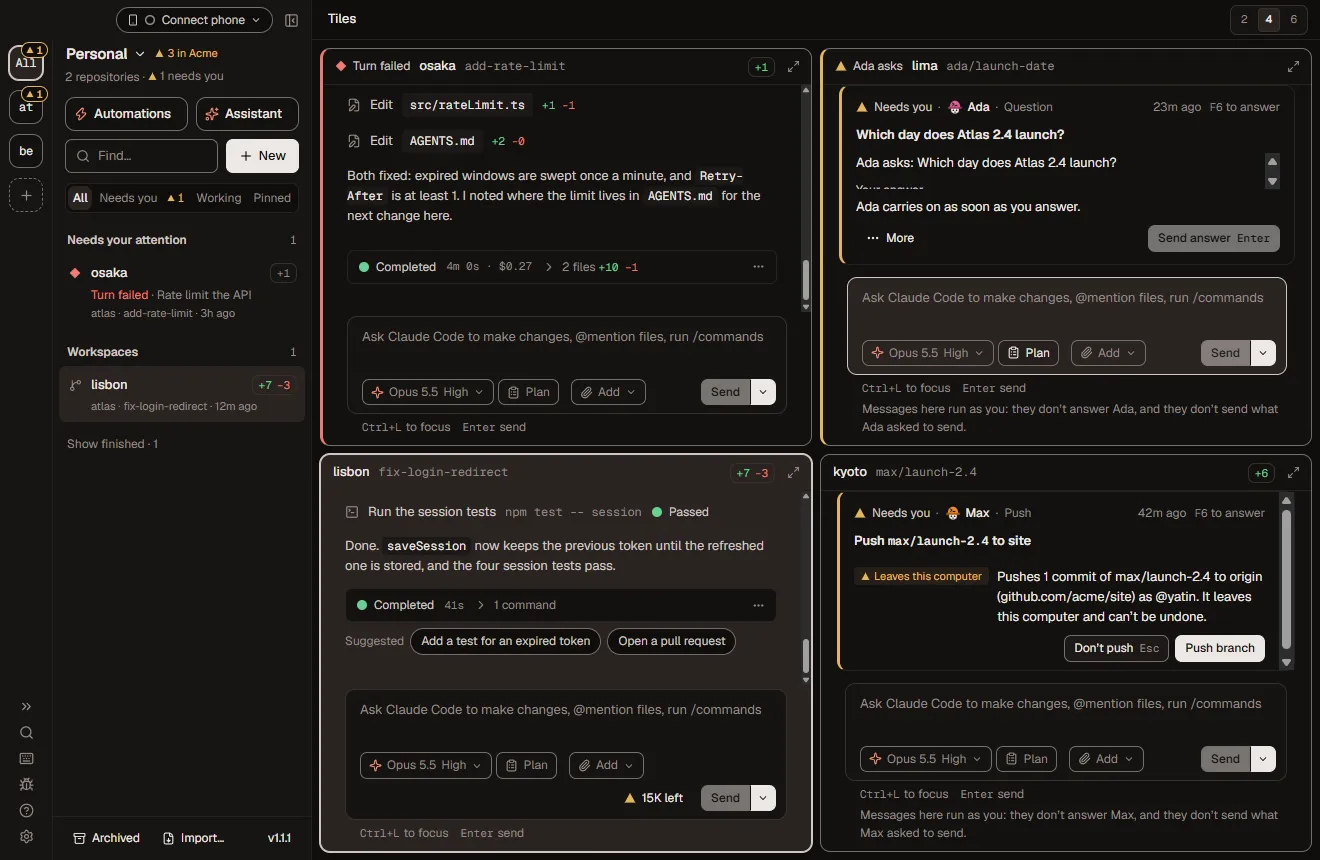
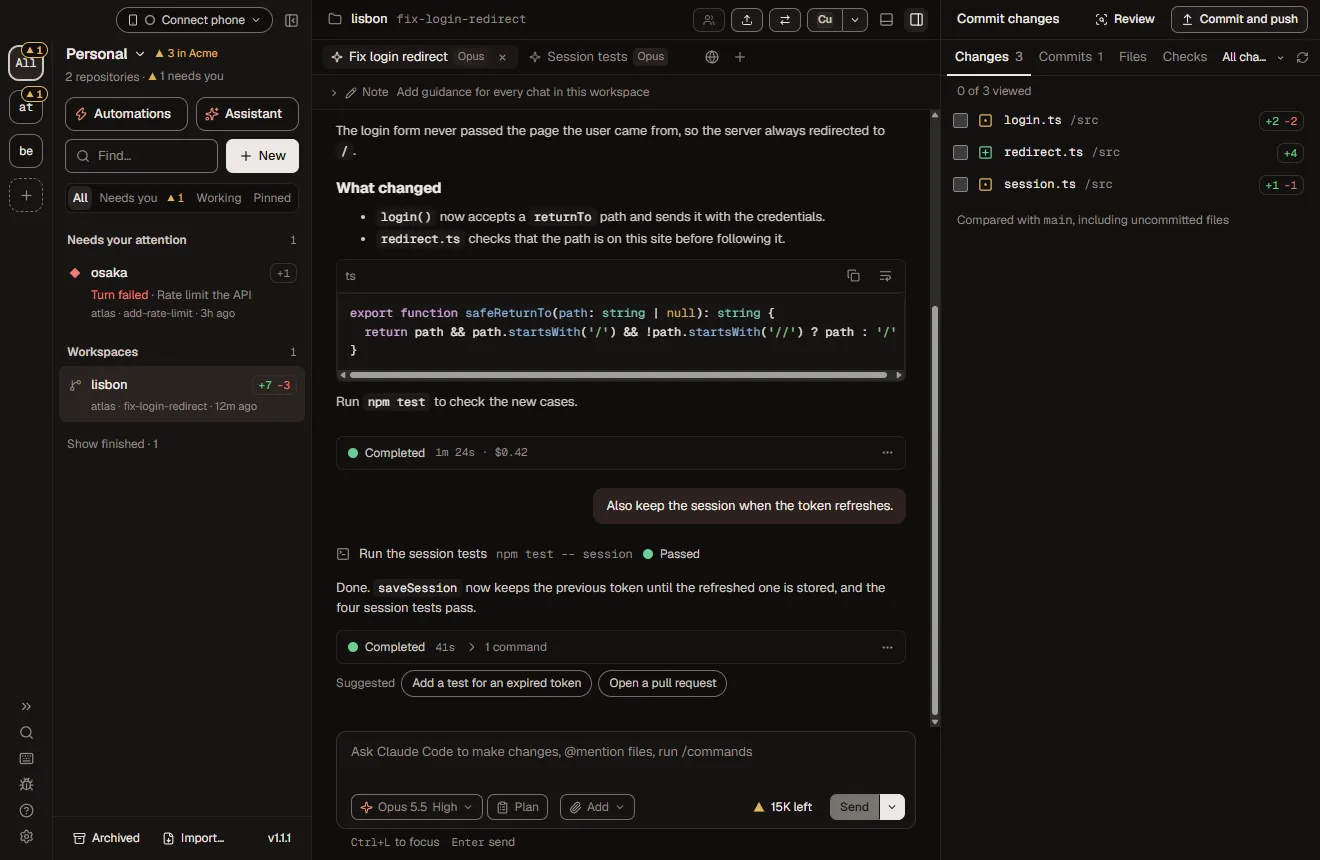
- The left rail is your queue. “Needs your attention” lists every workspace waiting on you, across repositories.
- Each turn ends in a receipt. Time, files and lines changed, so you know what to read before you read it.
- Changes are a list, not a surprise. Mark files viewed, then commit, push or open a pull request from the same window.
03 Features
What else is on the console?
Everything you need to run agents side by side and still sign off on every change that matters.
- 01
One worktree per agent
Every workspace is its own git worktree on its own branch. Agents never step on each other, and your main checkout stays clean.
- 02
Watch them all at once
Tiles shows several workspaces side by side so you can step in where you are needed. Built for 10 to 12 agents running at once.
- 03
Approvals that spell it out
An approval breaks a command down part by part, marks anything that leaves your computer, and says exactly what Always allow adds.
- 04
Review every change
Read each change as a diff before you commit, push or open a pull request. Checkpoints let you rewind a workspace to any turn.
- 05
Flows that loop until green
Write a way of working down once as a graph of agent steps: loops that run until the checks pass or a review comes back clean, and gates where you decide.
- 06
A real command line
Almost everything in the window works from a terminal with the foreman command. Every command takes --json and exit codes are stable, so scripts and CI can rely on them.
- 07
Run it from anywhere
Pair your phone with a QR code to approve, steer and comment on diffs, live. Away from home it connects over your own Tailscale network, with no Foreman relay. A browser on another computer can open the whole app.
- 08
Local-first. No account.
Foreman runs on your computer. There is no Foreman account, no cloud service and no telemetry upload. Agents use your own logins and API keys.
- 09
Automations and schedules
Save prompts as templates and run them on demand or on a schedule: hourly, daily, weekly or monthly, in your time zone. Run Foreman without a window, or at login, and schedules keep going.
- 10
GitHub, GitLab, Linear, Slack, Langfuse
Open, merge and auto-merge pull requests, watch CI and reviews, start work from a Linear issue, send Slack notifications and read Langfuse traces. Each connection gets the agent access you choose: nothing, read, or read and write.
- 11
AI employees
Give an organization employees with a role in plain words, a hard hat and access you approve. They work in fresh workspaces, remember through a git memory repository and hand work to each other.
- 12
Remote sandboxes: E2B, Daytona, Vercel, Docker
Run a workspace's worktree and agent in a sandbox on your own E2B, Daytona, Vercel Sandbox or Docker account. Provider keys never enter the sandbox, and turns keep going after you close the app. Experimental.
04 Performance
How many Claude Code agents can run in parallel?
Foreman is built and load-tested for 10 to 12 agents running at once.
Six fit on the wall above. Past a dozen, the limit is rarely the window. It is your attention, which is why the needs-you queue sorts the waiting from the working.
05 Compare
How is Foreman different from Conductor and T3 Code?
Foreman is open source under Apache-2.0 and runs on Windows as well as macOS, while Conductor is a closed-source Mac app. Foreman also drives OpenCode and any ACP agent, and adds flows that loop until checks pass, AI employees and a scriptable command line.
Both are open-source GUIs for coding agents. Foreman adds flows (agent graphs that loop until tests pass, with human gates), AI employees with a git-backed memory, a foreman CLI where every command takes --json, phone approvals and remote sandboxes.
—A dash means not listed on their site
| Feature | Foreman | Conductor | T3 Code |
|---|---|---|---|
| Open source | Apache-2.0 | No | MIT |
| macOS | Yes | Yes | Yes |
| Windows | Yes | Mac only | Yes |
| One git worktree per agent | Yes | Yes | Yes |
| Agents | Claude Code, Codex, Cursor, OpenCode, any ACP agent | Claude Code, Codex, Cursor | Claude Code, Codex and more |
| Flows that loop until checks pass, with human gates | Yes | — | — |
| AI employees with git-backed memory | Yes | — | — |
| Scheduled automations and auto-fix CI | Yes | — | — |
| Your own cloud sandboxes (E2B, Daytona, Vercel, Docker) | Experimental | — | — |
| Scriptable CLI, --json on every command | Yes | — | — |
| Approve from your phone | Yes | — | Yes |
| No account, no telemetry upload | Yes | — | — |
06 Get started
Get started in a minute
- Download Foreman. macOS (Apple Silicon, signed and notarized) or Windows. Git on your PATH is all it needs.
- Add a git repo and sign in an agent. Claude Code, Codex, Cursor or OpenCode, with your own login or API key, in Settings → Agents.
- Create workspaces. One per task. Each is a fresh worktree on its own branch. Open Tiles and watch them go.
# Start a workspace from a template and wait for the turn
$ foreman run fix-a-bug "the login page loops after sign-in" --repo atlas --wait
# See what is waiting for you
$ foreman approvals
# Open a draft pull request
$ foreman pr create atlas --draft
--json, and exit codes are stable. CLI referenceWhat is Foreman?
Foreman is a free, open-source desktop app for macOS and Windows that runs AI coding agents in parallel. Claude Code, Codex, Cursor and OpenCode each work in their own git worktree on their own branch, while you review diffs, answer questions and open pull requests from one window.
Is Foreman free and open source?
Yes. Foreman is free and licensed under Apache-2.0, with the full source on GitHub at github.com/elite-build/foreman. There is no paid tier, no account and no Foreman cloud service.
Which coding agents does Foreman support?
Foreman runs Claude Code, Codex, Cursor and OpenCode, plus any agent that speaks the Agent Client Protocol (ACP). Each agent signs in with your own subscription or API key, set in Settings → Agents.
How do I run multiple Claude Code agents in parallel?
Add a git repository to Foreman and create one workspace per task. Each workspace is a separate git worktree on its own branch, so several Claude Code sessions edit the same repository at once without conflicts. Tiles shows them side by side.
Why does each agent need its own git worktree?
A git worktree is a second checkout of the same repository on a different branch. Giving each agent its own worktree means agents never overwrite each other's files, every change lands on a reviewable branch, and your main checkout stays untouched.
Does my code leave my computer?
Only through the agents you choose. Foreman runs locally with no account and no telemetry upload; your agents talk to their own model providers. In your own workspaces, an approval marks any command that leaves your computer before it runs, and AI employees hold Slack posts and Linear changes for you.
Do coding agents need my approval for every command?
Only if you want them to. Approvals are a setting: with Claude Code tool approvals on (Settings → Account), each command is spelled out part by part before it runs, anything that leaves your computer is marked, and Always allow shows exactly what it adds. Every agent still works in its own worktree, and checkpoints rewind any turn.
Which operating systems does Foreman run on?
Foreman runs on macOS (Apple Silicon, signed and notarized) and Windows. You need Git on your PATH and a login or API key for at least one agent.
Can Foreman run coding agents on a schedule?
Yes. Any saved prompt template can run hourly, daily, weekly or monthly in your time zone, and opt-in auto-fix sends failing CI logs to your agent. Scheduled runs use Claude Code and happen while Foreman is running, which can be without a window or from login.
Can I control Foreman from my phone?
Yes. Pair a phone with a QR code to answer approvals, steer agents, comment on diffs and read terminals, live. On the same Wi-Fi it connects directly, and anywhere else through your own Tailscale network. Native iOS and Android apps are coming soon.
Can coding agents run in a cloud sandbox like E2B?
Yes, as an experiment. A workspace's worktree and agent can run in a sandbox on your own E2B, Daytona, Vercel Sandbox or Docker account, for Claude Code, Codex and OpenCode. Provider keys stay on your computer and never go into the sandbox.
Which integrations does Foreman have?
GitHub (pull requests, merges, CI and reviews), GitLab, Linear, Slack and Langfuse, plus MCP. Each connection has a default per service, each repository can pick its own, and you choose what agents may do with it: nothing, read, or read and write.
How is Foreman different from Conductor?
Foreman is open source under Apache-2.0 and runs on Windows as well as macOS, while Conductor is a closed-source Mac app. Foreman also drives OpenCode and any ACP agent, and adds flows that loop until checks pass, AI employees and a scriptable command line.
How is Foreman different from T3 Code?
Both are open-source GUIs for coding agents. Foreman adds flows (agent graphs that loop until tests pass, with human gates), AI employees with a git-backed memory, a foreman CLI where every command takes --json, phone approvals and remote sandboxes.
Can I script Foreman or use it in CI?
Yes. The foreman command starts workspaces, sends messages, answers approvals, opens and merges pull requests and runs flows. Every command takes --json and exit codes are the same for every command.
08 Build it with us
The console is open source. Pull up a chair.
31 releases since 1.0.0 on Oct 27. Apache-2.0, built in the open. Star it to follow along, fork it to make it yours, or pick up a good first issue and ship a fix this week.