git tag --list 'v*' | wc -l 31
The open-source AI coding app that ships almost every day
Foreman is a free, open-source desktop app for macOS and Windows that runs Claude Code, Codex, Cursor and OpenCode in parallel, each in its own git worktree on its own branch. You review the diffs, answer the questions and open the pull requests from one window.
- macOS & Windows
- Apache-2.0
- No account
- No telemetry upload
Releases since v1.0.0
31
- Days since 1.0.0
- 21
- Days with a release
- 17/22
- Most in a day
- 4 · 2 Nov, 16 Nov
- Per day, on average
- 1.4
a9763a0Latest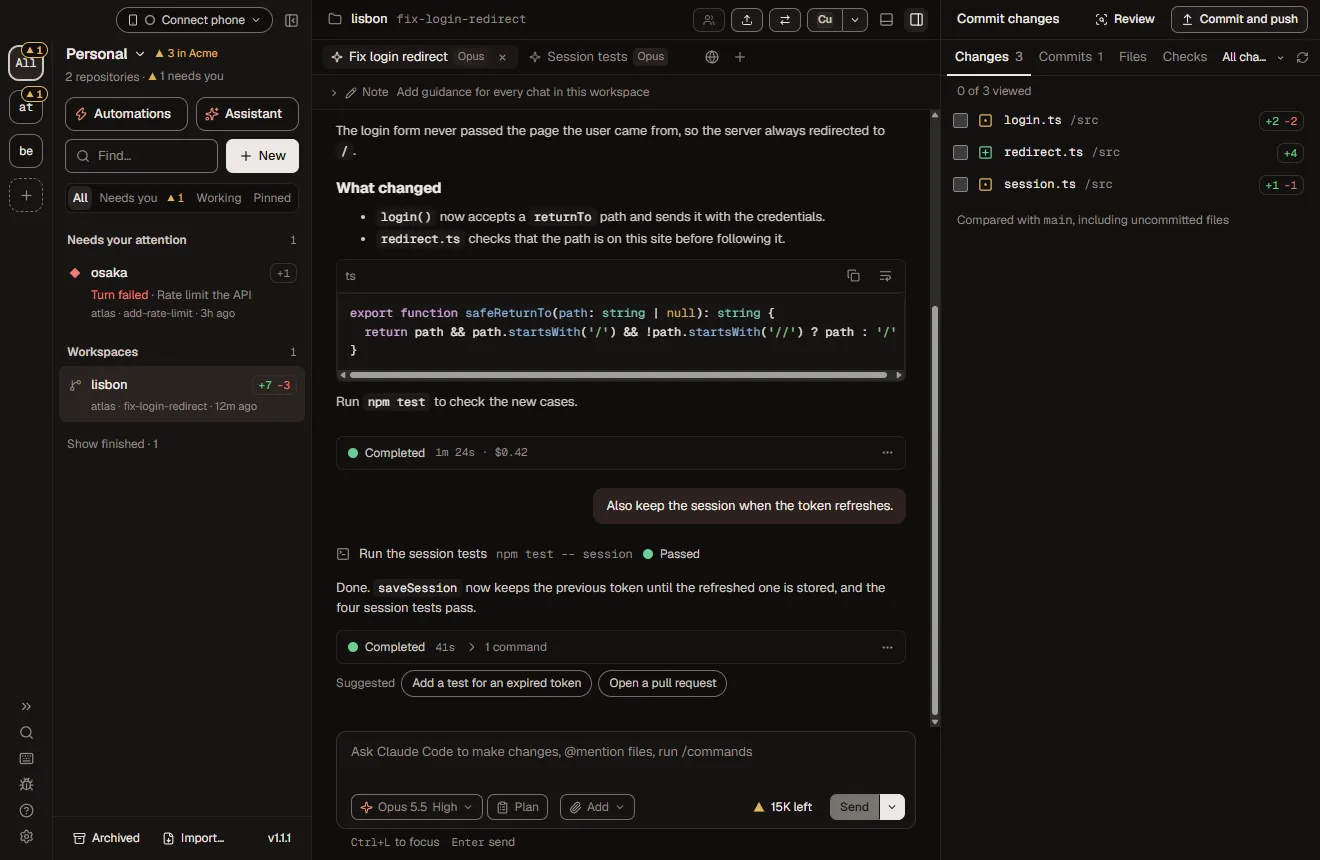
// changelog
Is Foreman actively maintained?
Yes. Foreman has shipped 31 releases in the 21 days from 1.0.0 on to v1.2.4 on , with a release on 17 of those 22 days.
All 31 are below, newest first, each linked to its release on GitHub. Click a day to see what shipped on it.
1.2 Priya and projects
v1.2.4LatestDesign parts draw HTML mocks; every employee can push and open PRs
- AddedA project part that designs screens draws them as HTML mocks, two options each, with a button in the channel to open each in your browser. The UX designer, Uma, now draws mocks for what she proposes.
- ChangedEvery AI employee, Priya and the job templates included, can change its organization’s repositories, push and open pull requests without waiting for you.
- ChangedRuns a day and Minutes a run are optional and empty by default.
- FixedClicking a Foreman notification on Windows brings the window to the front again, even when minimized.
Release v1.2.4 on GitHub ↗Diff v1.2.3…v1.2.4DMG · NSIS installer · SHA256SUMS.txt
v1.2.3NotablePick a job, Priya asks before she plans, plans drawn as workflows
- AddedNew employee opens on Pick a job: choose one of fifteen jobs and Add makes that employee approved and ready.
- AddedThe program manager asks all her questions on one card before she plans, or plans with what you have.
- AddedA project’s plan is drawn as a workflow, and its Parts card can show the parts as a map.
- FixedA project no longer stops with “Maximum of 10 chats per workspace” after about ten employee runs.
Release v1.2.3 on GitHub ↗Diff v1.2.2…v1.2.3DMG · NSIS installer · SHA256SUMS.txt
v1.2.2Fifteen job templates in New organization
- AddedNew organization lets you pick ready employees as well as Priya, from fifteen job templates such as software engineer and UX designer.
Release v1.2.2 on GitHub ↗Diff v1.2.1…v1.2.2DMG · NSIS installer · SHA256SUMS.txt
v1.2.1Channels you can rename, archive and delete
- AddedThe Channels row has a + that starts a new channel with @Priya, and each channel can be renamed, archived or deleted.
- AddedAll channels: one page with every channel of the organization, archived ones too.
- ChangedA closed channel is archived after two weeks instead of disappearing, and can be restored.
Release v1.2.1 on GitHub ↗Diff v1.2.0…v1.2.1DMG · NSIS installer · SHA256SUMS.txt
v1.2.0NotablePriya, the program manager every organization has
- AddedEvery organization has a program manager, Priya. Tag @Priya in the organization’s channel to start a project: she plans it, proposes employees when nobody fits, and the parts run with your checks.
- AddedHand to Priya… hands her a workspace that grew into a project, with its chat and branch.
- AddedAsk a follow-up on an employee’s finished task.
Release v1.2.0 on GitHub ↗Diff v1.1.1…v1.2.0DMG · NSIS installer · SHA256SUMS.txt
1.1 AI employees
v1.1.1A double-click on send can no longer stop the turn it started
- ChangedWhile an agent works, the button stays Steer or Queue and Stop is a small ■ beside it.
- ChangedThe files and commands under a turn’s Completed line start folded.
Release v1.1.1 on GitHub ↗Diff v1.1.0…v1.1.1DMG · NSIS installer · SHA256SUMS.txt
v1.1.0NotableAI employees, organizations and a memory repository
- AddedAI employees: organizations with their own memory repository, and employees you approve and ask for work, or start on a schedule or an event. They hold pushes, pull requests, Slack posts and Linear changes for you in Needs you.
- ChangedAn approval spells out a command part by part, marks anything that leaves this computer, and says exactly what Always allow adds.
- ChangedEach turn ends with a receipt of its outcome, files and commands; a failed turn leads with its cause and Retry.
- FixedOn Windows, a workspace archived after an employee’s run no longer stays behind half-deleted.
Release v1.1.0 on GitHub ↗Diff v1.0.23…v1.1.0DMG · NSIS installer · SHA256SUMS.txt
1.0 Worktrees, flows, phones
v1.0.23Resumed background agents get their own subagent row
- FixedA background agent that Claude resumes shows as its own subagent row, with Stop, instead of a plain SendMessage row.
- FixedLimits and Usage in Settings scroll to the right section.
Release v1.0.23 on GitHub ↗Diff v1.0.22…v1.0.23DMG · NSIS installer · SHA256SUMS.txt
v1.0.22NotableAccounts per agent, usage limits that resume, a live phone
- AddedMore than one account per agent (work and personal), each with its own sign-in.
- AddedA chat that hits a usage limit waits and resumes by itself when the limit resets, or continues on another account.
- AddedCodex can plan, and messages sent while Codex works reach it in the running turn.
- AddedThe phone updates live, can Steer or Queue, comment on lines and follow terminals. foreman service install keeps schedules running with no window.
- SecurityPairing links and codes are shown only to devices with full control.
Release v1.0.22 on GitHub ↗Diff v1.0.21…v1.0.22DMG · NSIS installer · SHA256SUMS.txt
v1.0.21New flow from blank, a description or a copy
- AddedNew flow asks what it is called and where it starts: Blank, Describe it, or a copy of a flow.
- AddedRename a flow’s steps; every edge and loop that names one follows, with Undo.
- FixedA workspace whose PR merged offers Archive again when a test run only changed line endings.
Release v1.0.21 on GitHub ↗Diff v1.0.20…v1.0.21DMG · NSIS installer · SHA256SUMS.txt
v1.0.20Full-screen terminal and flow run, with the chat beside them
- ChangedFull screen for the terminal and a flow’s run puts it in the middle of the workspace with the chat beside it.
- ChangedEvery input a flow asks for gets a text area, not a one-line box.
Release v1.0.20 on GitHub ↗Diff v1.0.19…v1.0.20DMG · NSIS installer · SHA256SUMS.txt
v1.0.19Flow runs say where they are and why they stopped
- ChangedA flow run’s tab says where the run is or where it stopped, and Why it stopped opens the failed step’s chat.
- FixedA flow run whose agent wasn’t signed in now waits for you instead of ending as Failed.
Release v1.0.19 on GitHub ↗Diff v1.0.18…v1.0.19DMG · NSIS installer · SHA256SUMS.txt
v1.0.18Choose a flow run’s models: Faster, Balanced or Best
- AddedChoose a flow run’s models for the whole run, per persona or per step.
- AddedAutomations gets Flows and Personas tabs beside Templates and Commands.
Release v1.0.18 on GitHub ↗Diff v1.0.17…v1.0.18DMG · NSIS installer · SHA256SUMS.txt
v1.0.17A flow opens as its own page, with an assistant
- AddedA flow opens as its own page: its graph with zoom and full screen, and an assistant that proposes changes you see on the graph first.
- ChangedThe Flow and Lineage tabs draw readable graphs you can click into.
Release v1.0.17 on GitHub ↗Diff v1.0.16…v1.0.17DMG · NSIS installer · SHA256SUMS.txt
v1.0.16NotableTen built-in personas and eleven built-in flows
- AddedTen built-in personas and eleven built-in flows, from Test first to From an idea to a feature.
- AddedA persona can be allowed to write only inside chosen folders; a flow can open its own draft pull request.
- FixedCodex models show the context window Codex actually works with.
Release v1.0.16 on GitHub ↗Diff v1.0.15…v1.0.16DMG · NSIS installer · SHA256SUMS.txt
v1.0.15NotableFlows: graphs of agent steps with loops and gates
- AddedFlows, behind an Experimental switch: a graph of agent steps with loops and gates, run from Automations, a schedule or the foreman flow command.
- AddedGates, where you decide: Continue, Send back with a note, or Stop, in Needs you and on the phone.
- AddedClick a file path in the chat to open it; programs are only shown in their folder, never run.
- Securityfollow-redirects updated to 1.16.2 (GHSA-mrwp-f3q8-3g9p).
Release v1.0.15 on GitHub ↗Diff v1.0.14…v1.0.15DMG · NSIS installer · SHA256SUMS.txt
v1.0.14Automations opens on a searchable library
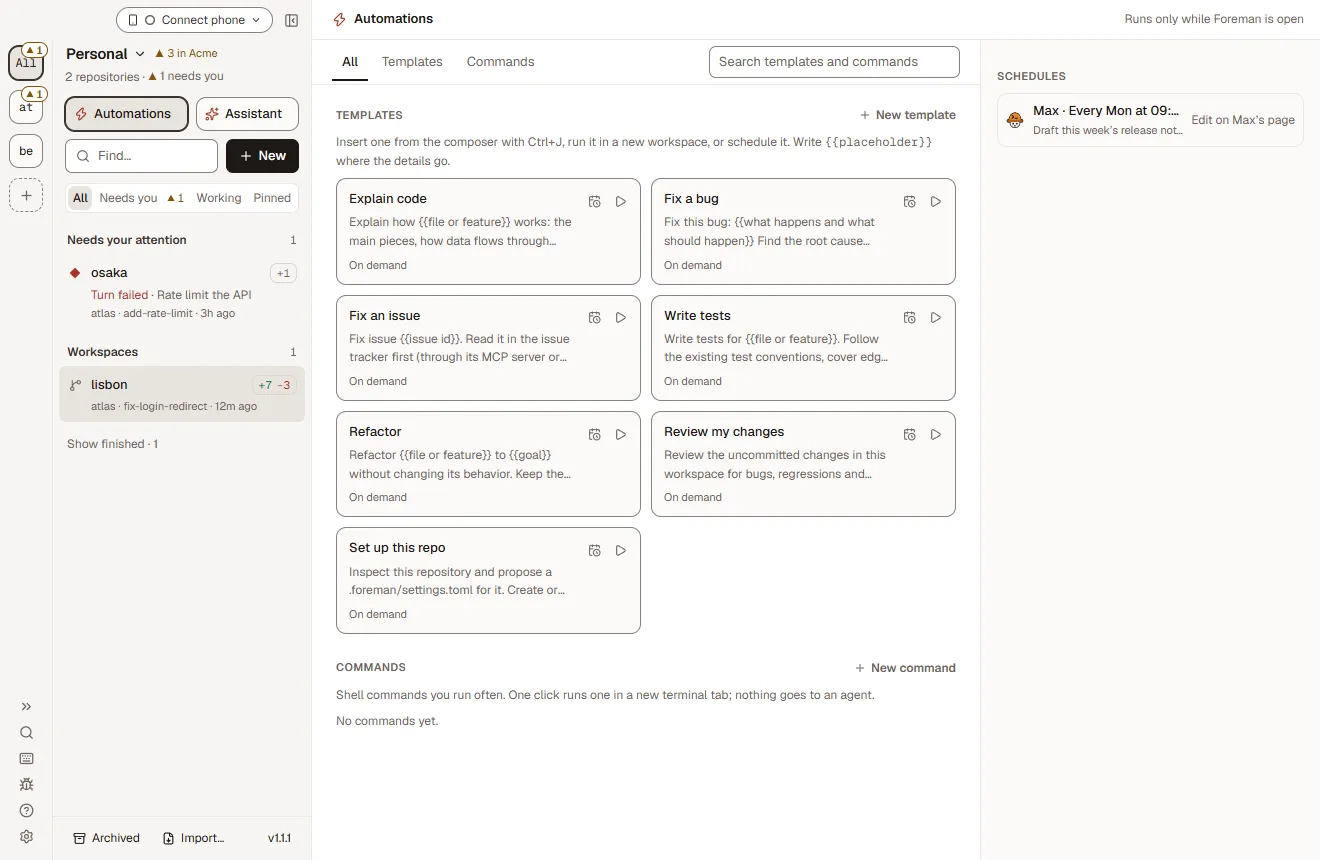
- ChangedAutomations opens on a searchable library of templates and commands, with schedules listed beside it.
- ChangedThe repository rail shows each repository’s name, with a searchable drawer.
Release v1.0.14 on GitHub ↗Diff v1.0.13…v1.0.14DMG · NSIS installer · SHA256SUMS.txt
v1.0.13See what fills a chat’s context
- AddedPressing a chat’s context ring shows what fills it.
- ChangedNotifications can go on their own, and a stopped archive stays in Needs you.
Release v1.0.13 on GitHub ↗Diff v1.0.12…v1.0.13DMG · NSIS installer · SHA256SUMS.txt
v1.0.12Control Foreman on another of your computers
- AddedControl Foreman on another of your computers from this window.
- AddedChoose an existing branch from a searchable list.
- ChangedScripts and terminals sit in header tabs, and a workspace is named after its branch when the branch is named first.
Release v1.0.12 on GitHub ↗Diff v1.0.11…v1.0.12DMG · NSIS installer · SHA256SUMS.txt
v1.0.11Signed macOS builds retry Apple’s ticket service
- FixedJumping to a reply in a long chat no longer scrolls the window.
- FixedThe macOS release build retries Apple’s ticket service when it staples or validates a notarized app.
Release v1.0.11 on GitHub ↗Diff v1.0.10…v1.0.11DMG · NSIS installer · SHA256SUMS.txt
v1.0.10Run scripts and terminals in a side rail
- AddedRun scripts and terminals in a side rail, and run several scripts at once.
Release v1.0.10 on GitHub ↗Diff v1.0.9…v1.0.10Notes only, no installers attached
v1.0.9Report a problem, and give agents a selected element
- AddedA Report a problem button that gathers local evidence for a bug report.
- AddedA browser element you select reaches the agent with its HTML, styles, component, source and a picture.
Release v1.0.9 on GitHub ↗Diff v1.0.8…v1.0.9DMG · NSIS installer · SHA256SUMS.txt
v1.0.8Claude turns survive a follow-up that cuts them off
- FixedA Claude turn keeps going when a follow-up cuts off its request.
- FixedA Claude process that outlives its turn no longer holds the next message.
Release v1.0.8 on GitHub ↗Diff v1.0.7…v1.0.8DMG · NSIS installer · SHA256SUMS.txt
v1.0.7Archiving shows in the sidebar and header
- ChangedA workspace that is archiving says so in the sidebar and its header.
- ChangedThe workspace’s namesake sits at the top of every chat.
Release v1.0.7 on GitHub ↗Diff v1.0.6…v1.0.7DMG · NSIS installer · SHA256SUMS.txt
v1.0.6Choose which integrations each workspace gets
- AddedA Langfuse integration, so agents can read an app’s traces.
- AddedChoose which integrations each workspace’s agents get.
- FixedWorkspace headers no longer overlap in narrow columns.
Release v1.0.6 on GitHub ↗Diff v1.0.5…v1.0.6DMG · NSIS installer · SHA256SUMS.txt
v1.0.5NotablemacOS releases signed and notarized
- ChangedmacOS releases are signed with a Developer ID certificate and notarized by Apple.
- AddedThe pull request’s number shows in the side panel header while it is open.
Release v1.0.5 on GitHub ↗Diff v1.0.4…v1.0.5DMG · NSIS installer · SHA256SUMS.txt
v1.0.4An Editor window layout
- AddedAn Editor layout: an activity bar, files in the middle and the chat beside them.
Release v1.0.4 on GitHub ↗Diff v1.0.3…v1.0.4DMG · NSIS installer · SHA256SUMS.txt
v1.0.3Auto-archive finished work; views for the sidebar
- AddedFinished work archives itself: completed scheduled runs and merged pull requests.
- AddedCustomize the sidebar, board and Home with views, and save workspaces for later.
Release v1.0.3 on GitHub ↗Diff v1.0.2…v1.0.3DMG · NSIS installer · SHA256SUMS.txt
v1.0.2Updates that check and install themselves
- AddedForeman keeps checking for new releases and, on Windows, downloads and installs them in the background.
- AddedA progress strip, Committed → PR → Checks → Merged, once a pull request merges.
- ChangedReleases carry the update files and installer names without spaces.
Release v1.0.2 on GitHub ↗Diff v1.0.1…v1.0.2DMG · NSIS installer · SHA256SUMS.txt
v1.0.1OpenCode plans show again; Electron 45
- FixedPlans from ACP agents such as OpenCode show in the chat again.
- FixedThe macOS app is ad-hoc signed, so a downloaded DMG opens with Open Anyway.
- ChangedElectron 45.
Release v1.0.1 on GitHub ↗Diff v1.0.0…v1.0.1DMG · NSIS installer · SHA256SUMS.txt
v1.0.0NotableFirst release
- AddedThe first public release. Foreman tells you when a newer version is out and shows the running version in the sidebar.
- FixedCPU and memory stay flat when many agents run in parallel.
- SecurityTighter local CLI socket authorization and bridge input checks.
Release v1.0.0 on GitHub ↗DMG · NSIS installer · SHA256SUMS.txt
// release.yml
How are Foreman releases built?
Each release is an annotated v tag on main, built by a GitHub Actions workflow that packages both installers, signs and notarizes the macOS app, and attaches SHA256SUMS.txt to a draft that is read before it is published.
Every pull request carries a one-line release note, and those become the changelog. The macOS app has been Developer ID signed and notarized since 1.0.5. The Windows installer is unsigned until SignPath Foundation approves the project, and the docs say so.
- Release note in every PR
.github/pull_request_template.md - Bump the version, through a PR
npm run release -- prepare patch - Tag main
npm run release -- tag --push - Run the Release workflow on the tag
gh workflow run release.yml --ref v1.2.4 - Build both installersmacos-15 DMG · Developer ID signed · notarized · stapledwindows-2022 NSIS installer · unsigned for now
- Draft release with checksums and update files
SHA256SUMS.txt · latest.yml · latest-mac.yml - Read, then publishInstalled copies offer it in the sidebar within hours
Check your download
macOS, in the folder with the DMG and SHA256SUMS.txt
shasum -a 256 -c SHA256SUMS.txt --ignore-missingWindows PowerShell, then compare with SHA256SUMS.txt
Get-FileHash .\Foreman-Setup-1.2.4.exe -Algorithm SHA256// features
What can Foreman do after 31 releases?
It runs your coding agents side by side, each on its own branch, and lets you review, approve and merge their work from one window, or from a terminal, a schedule or your phone.
One worktree per agent
Every workspace is its own git worktree on its own branch. Agents never step on each other, and your main checkout stays clean.
Watch them all at once
Tiles shows several workspaces side by side so you can step in where you are needed. Built for 10 to 12 agents running at once.
Review every change
Read each change as a diff before you commit, push or open a pull request. Checkpoints let you rewind a workspace to any turn.
Approvals that spell it outv1.1.0
An approval breaks a command down part by part, marks anything that leaves your computer, and says exactly what Always allow adds.
Flows that loop until greenv1.0.15
Write a way of working down once as a graph of agent steps: loops that run until the checks pass or a review comes back clean, and gates where you decide.
AI employeesv1.1.0
Give an organization employees with a role in plain words, a hard hat and access you approve. They work in fresh workspaces, remember through a git memory repository and hand work to each other.
A real command line
Almost everything in the window works from a terminal with the foreman command. Every command takes --json and exit codes are stable, so scripts and CI can rely on them.
Automations and schedulesv1.0.14
Save prompts as templates and run them on demand or on a schedule: hourly, daily, weekly or monthly, in your time zone. Run Foreman without a window, or at login, and schedules keep going.
Run it from anywherev1.0.22
Pair your phone with a QR code to approve, steer and comment on diffs, live. Away from home it connects over your own Tailscale network, with no Foreman relay. A browser on another computer can open the whole app.
Local-first. No account.
Foreman runs on your computer. There is no Foreman account, no cloud service and no telemetry upload. Agents use your own logins and API keys.
// next
What is shipping next, and where can I help?
The design docs in the repository say what is written down but not built yet, and the issue tracker has good first issues for anyone who wants to help.
In the docs, not in the app yet
- Organization sandboxes. An organization's cloud defaults that its employees run in. docs/ai-employees.md §13
- Job profiles, work reports and a wiki. One report format for what employees hand back. §16
- Projects that run as flows. Parts are employee tasks today, not flow steps. §15
- A signed Windows installer, through SignPath Foundation, once it approves the project.
Help wanted
Watch releases
Get one notification per release, and nothing else from the repository:
- Open elite-build/foreman on GitHub
- Press Watch, then Custom
- Tick Releases and press Apply
Or follow the feed: releases.atom
Watch on GitHub// compare
How is Foreman different from Conductor and T3 Code?
Foreman is Apache-2.0 open source and runs on macOS and Windows, where Conductor is closed source and Mac only. Next to T3 Code, it adds flows, AI employees with a git-backed memory and a CLI where every command takes --json.
—A dash means not listed on their site
| Feature | Foreman | Conductor | T3 Code |
|---|---|---|---|
| Open source | Apache-2.0 | No | MIT |
| macOS | Yes | Yes | Yes |
| Windows | Yes | Mac only | Yes |
| One git worktree per agent | Yes | Yes | Yes |
| Agents | Claude Code, Codex, Cursor, OpenCode, any ACP agent | Claude Code, Codex, Cursor | Claude Code, Codex and more |
| Flows that loop until checks pass, with human gates | Yes | — | — |
| AI employees with git-backed memory | Yes | — | — |
| Scheduled automations and auto-fix CI | Yes | — | — |
| Your own cloud sandboxes (E2B, Daytona, Vercel, Docker) | Experimental | — | — |
| Scriptable CLI, --json on every command | Yes | — | — |
| Approve from your phone | Yes | — | Yes |
| No account, no telemetry upload | Yes | — | — |
// install
Get started in a minute
- Download Foreman for macOS (Apple Silicon) or Windows. You need Git on your PATH.
- Add a git repository and sign in an agent in Settings → Agents, with your own login or API key.
- Create workspaces, one per task. Each is a worktree on its own branch; Tiles shows them side by side.
# Start a workspace from a template and wait for the turn
foreman run fix-a-bug "the login page loops after sign-in" --repo atlas --wait# Loop until the checks pass
foreman flow run fix-until-green --input task="make the tests pass" --waitEvery command takes --json, with the same exit codes everywhere. CLI reference
// faq
Questions developers ask
What is Foreman?
Foreman is a free, open-source desktop app for macOS and Windows that runs AI coding agents in parallel. Claude Code, Codex, Cursor and OpenCode each work in their own git worktree on their own branch, while you review diffs, answer questions and open pull requests from one window.
Is Foreman free and open source?
Yes. Foreman is free and licensed under Apache-2.0, with the full source on GitHub at github.com/elite-build/foreman. There is no paid tier, no account and no Foreman cloud service.
Which coding agents does Foreman support?
Foreman runs Claude Code, Codex, Cursor and OpenCode, plus any agent that speaks the Agent Client Protocol (ACP). Each agent signs in with your own subscription or API key, set in Settings → Agents.
How do I run multiple Claude Code agents in parallel?
Add a git repository to Foreman and create one workspace per task. Each workspace is a separate git worktree on its own branch, so several Claude Code sessions edit the same repository at once without conflicts. Tiles shows them side by side.
Why does each agent need its own git worktree?
A git worktree is a second checkout of the same repository on a different branch. Giving each agent its own worktree means agents never overwrite each other's files, every change lands on a reviewable branch, and your main checkout stays untouched.
Does my code leave my computer?
Only through the agents you choose. Foreman runs locally with no account and no telemetry upload; your agents talk to their own model providers. In your own workspaces, an approval marks any command that leaves your computer before it runs, and AI employees hold Slack posts and Linear changes for you.
Do coding agents need my approval for every command?
Only if you want them to. Approvals are a setting: with Claude Code tool approvals on (Settings → Account), each command is spelled out part by part before it runs, anything that leaves your computer is marked, and Always allow shows exactly what it adds. Every agent still works in its own worktree, and checkpoints rewind any turn.
Which operating systems does Foreman run on?
Foreman runs on macOS (Apple Silicon, signed and notarized) and Windows. You need Git on your PATH and a login or API key for at least one agent.
Can Foreman run coding agents on a schedule?
Yes. Any saved prompt template can run hourly, daily, weekly or monthly in your time zone, and opt-in auto-fix sends failing CI logs to your agent. Scheduled runs use Claude Code and happen while Foreman is running, which can be without a window or from login.
Can I control Foreman from my phone?
Yes. Pair a phone with a QR code to answer approvals, steer agents, comment on diffs and read terminals, live. On the same Wi-Fi it connects directly, and anywhere else through your own Tailscale network. Native iOS and Android apps are coming soon.
Can coding agents run in a cloud sandbox like E2B?
Yes, as an experiment. A workspace's worktree and agent can run in a sandbox on your own E2B, Daytona, Vercel Sandbox or Docker account, for Claude Code, Codex and OpenCode. Provider keys stay on your computer and never go into the sandbox.
Which integrations does Foreman have?
GitHub (pull requests, merges, CI and reviews), GitLab, Linear, Slack and Langfuse, plus MCP. Each connection has a default per service, each repository can pick its own, and you choose what agents may do with it: nothing, read, or read and write.
How is Foreman different from Conductor?
Foreman is open source under Apache-2.0 and runs on Windows as well as macOS, while Conductor is a closed-source Mac app. Foreman also drives OpenCode and any ACP agent, and adds flows that loop until checks pass, AI employees and a scriptable command line.
How is Foreman different from T3 Code?
Both are open-source GUIs for coding agents. Foreman adds flows (agent graphs that loop until tests pass, with human gates), AI employees with a git-backed memory, a foreman CLI where every command takes --json, phone approvals and remote sandboxes.
Can I script Foreman or use it in CI?
Yes. The foreman command starts workspaces, sends messages, answers approvals, opens and merges pull requests and runs flows. Every command takes --json and exit codes are the same for every command.
// v1.2.4 → next
Be in the next release notes
The next version is a pull request away. Star the repo to follow along, fork it to make it yours, or pick a good first issue and see your change in a changelog with a link to your PR.
v1.2.5unreleasedyour-sha
AddedYour change, in your words, with a link to your pull request.
gh repo fork elite-build/foreman --clone