SheetG-001
TitleCover sheet
Scale1 agent = 1 git worktree
SetForeman · 9 sheets
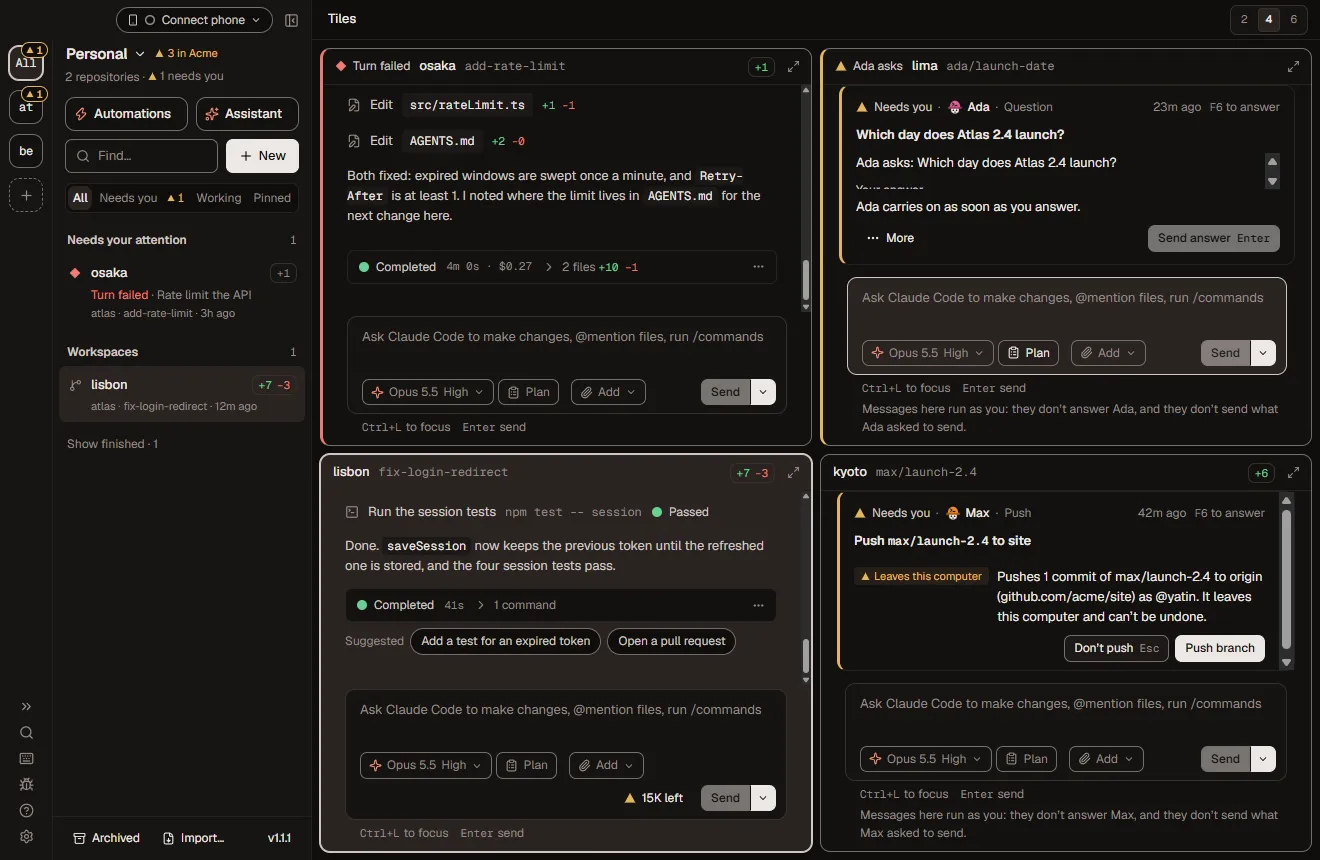
A drawing set for your repo. Checked by you.
AI agent orchestration, drawn to scale.
Foreman is a free, open-source desktop app for macOS and Windows that runs AI coding agents in parallel. Claude Code, Codex, Cursor and OpenCode each work in their own git worktree on their own branch, while you review diffs, answer questions and open pull requests from one window.
Every sheet below is one part of it, and every sheet works. Use one and watch the set get revised.
- macOS & Windows
- Apache-2.0
- No account
- v1.2.4
 The drawing's stamp. Press to stamp it again.
- I plan the change. I never touch the files.
- I build it, then fix it until the checks pass.
- I find problems. Fixing them isn't my job.
- Nothing ships until I open the gate.
- Project
- your repo
- Drawn by
- the assistant
- Checked by
- you
- Rev
- A
- Date
- Licence
- Apache-2.0
G-002 Drawing index
What's in the drawing set?
Eight sheets, one for each part of Foreman: the site plan of parallel agents, staffing, schedules, integrations, cloud sandboxes, flows, crew assignment and your phone. Every sheet is a working model.
| Sheet | Title | Shows | Note | Rev |
|---|---|---|---|---|
| A-101 | Site plan | Parallel agents, one worktree each | Illustrative | A issued |
| A-102 | Staffing | AI employees and their access | Unattended: Claude Code | A issued |
| A-201 | Schedule | Templates and schedules | Runs while Foreman runs | A issued |
| A-301 | Services and utilities | GitHub, Linear, Slack, Langfuse, MCP | Slack: outbound only | A issued |
| A-401 | Off-site works | E2B, Daytona, Vercel, Docker sandboxes | Experimental | A issued |
| A-501 | Process | Flows that loop until green, with your gate | Experimental | A issued |
| A-601 | Crew assignment | Which agent takes which job | Illustrative | A issued |
| A-701 | Remote supervision | Your phone, and the apps coming | iOS & Android: coming soon | A issued |
General notes, whole set
- Every sheet is illustrative. Templates, jobs, limits and flow names are the app's own.
- Flows and remote sandboxes are experimental and off by default.
- Unattended work (schedules, AI employees, flow steps that write code) runs on Claude Code.
- Use any sheet and the set is revised. Watch the Rev column.
SheetA-101
TitleSite plan
Scale1 lane = 1 git worktree
Rev Aissued for review
Tap a hat or a work order. Each agent walks into its own lane.
What is AI agent orchestration?
AI agent orchestration is running several coding agents on one codebase at the same time, each on its own task, without them colliding. Foreman does it with git: every agent gets its own worktree on its own branch, and you assign, watch and review the work from one window.
General notes
- One lane is one git worktree on its own branch. Your main checkout stays clean.
- Built and load-tested for 10 to 12 agents at once.
- Claude Code, Codex, Cursor, OpenCode or any ACP agent, each on your own login or key.
- Board is illustrative; the branch names are made up.
- 01osaka
Open lane · waiting for a hat
fix-login-redirectClaude Code+12 −3 · ready for review
- 02lisbon
Open lane · waiting for a hat
add-rate-limitCodex+10 −1 · ready for review
- 03kyoto
Open lane · waiting for a hat
write-testsCursor+48 −0 · ready for review
- 04lima
Open lane · waiting for a hat
update-docsOpenCode+6 −2 · ready for review
4 worktrees open · 4 signed off
Off site? Supervise from your phone: sheet A-701Agents sharing a folder: none. Each agent works in its own git worktree.
SheetA-102
TitleStaffing
Scale1 hat = 1 employee
Rev Aissued for review
Hire from the fifteen job templates. Remove anyone with the ×.
Can AI agents work as a team?
Yes, as AI employees. Give an organization employees with a role in plain words, a hard hat and access you approve. They work in fresh workspaces, remember through a git memory repository and hand work to each other. Priya, the program manager, plans each project and you approve it.
General notes
- 15 job templates, from software engineer to SEO specialist, each with its own hat.
- Memory is a private git repository per organization, with a commit for each run.
- Since 1.2.4 employees push and open pull requests without waiting. Slack posts and Linear changes are held for you.
- Unattended runs use Claude Code.
Open roles 15
Engineering
Design
Product
Data
Writing
Marketing
Customers
Hat rule A hat says who, never state. If a job's colour is taken, the new hire wears the least-worn colour instead.
Slack posts and Linear changes start held for you. Since v1.2.4 an employee pushes and opens draft pull requests on its own; this switch is the one-line rule that holds those too.
Your team 5
You
The person · one of the team
Approve each plan and each hire, and anything you've asked the team to hold.
Priya Lead
Program manager
Plans every project, proposes who it needs, reviews each part and accepts the result.
Ravi
Staff software engineer
Builds and fixes features, with tests, on its own branch.
Uma
Staff UX designer
Reviews screens and flows, specifies what to build and draws it as mocks.
Quinn
Staff QA engineer
Reviews what others build and says what breaks.
Mei
Staff frontend engineer
Builds screens and components and keeps them accessible.
Omar
Staff security engineer
Reviews changes and dependencies for security risks.
Sofia
Staff site reliability engineer
Keeps builds, deploys and services healthy.
Kenji
Staff software architect
Shapes the system and reviews big changes before they start.
Leo
Staff web designer
Designs and builds marketing and content sites.
Nia
Staff product manager
Recommends what to build next and writes the requirements.
Dara
Staff data analyst
Answers questions with data and specifies dashboards.
Theo
Staff technical writer
Writes the docs and keeps them up to date.
Ines
Staff copywriter
Writes release notes, launch posts and site copy.
Sam
Staff SEO specialist
Audits the site for search and suggests fixes.
Ana
Staff marketing manager
Plans launches and the messages around them.
Jonah
Staff support engineer
Triages issues and traces what users report in the code.
SheetA-201
TitleSchedule
Scale1 slip = 1 schedule
Rev Aissued for review
Pin a template to the slip, say when it runs, file it.
Can you schedule AI coding agents?
Yes. Save a prompt as a template and Foreman runs it hourly, daily, weekly or monthly, in your time zone. It runs while Foreman runs, and Foreman can run with no window, or start at login with foreman service install.
General notes
- Schedules run while Foreman runs. A sleeping computer isn't woken.
- A run more than 5 minutes late is skipped, never replayed.
- Templates with
{{blanks}}can't be scheduled: a scheduled run can't stop to ask. - Scheduled runs use Claude Code. Edit the text and the schedule pauses until you approve it again.
The seven templates that ship 7
Saved prompts yours · blanks written out
Blanks fill in order: foreman run fix-a-bug "the login page loops". A scheduled run can't stop to ask, so only templates without {{blanks}} go on a schedule. Repository templates live in.foreman/templates and travel with the code.
Schedule slipNo. 0042
nightly-triage on atlas
- Every
- in Europe/London · your zone
- Runs on
- Claude Code, a Sonnet by default
- Max
- 5 to 480
- After
- Approved
- its text, the repo's setup, checks and MCP servers
Runs every day at 00:30 (Europe/London) · stops after 30 minutes · keeps the workspace
foreman schedules add nightly-triage --repo atlas --every daily --at 00:30 --tz Europe/LondonThe CLI has no flag for AFTER: set it in the app's Schedule dialog.
Runs on Claude Code while Foreman is running.
SheetA-301
TitleServices and utilities
Scale1 tag = 1 access level
Rev Aissued for review
Hang a tool on the belt, then read its tag: what the agent may do with it.
Which integrations does Foreman have?
GitHub (pull requests, merges, CI and reviews), GitLab, Linear, Slack and Langfuse, plus MCP. Each connection has a default per service, each repository can pick its own, and you choose what agents may do with it: nothing, read, or read and write.
General notes
- Slack is outbound only: notifications and posts. You can't approve from Slack.
- Langfuse is read-only. GitLab sends fewer pull request events than GitHub.
- Auto-fix CI is opt-in and answers failing CI only, not review comments: 2 fixes per commit, 5 per PR.
- Every agent also gets a
foreman-appMCP server to check its status and run checks.
- GitHub
- Linear
- Slack
- Langfuse
- MCP
- Sandboxes
- GitLab
Connections belong to the repository, so every new workspace in atlas starts with this belt.
7 of 7 tools on the belt
The tags on the belt
Each tool's tag says what the agent can do with it and what stays held for you.
Still on the board
SheetA-401
TitleOff-site works
Scale1 container = 1 sandbox
Rev Aissued for review
Pick a workspace and a container, ship it, then close the laptop.
Can coding agents run in a cloud sandbox?
Yes, as an experiment. A workspace's worktree and agent can run in a sandbox on your own E2B, Daytona, Vercel Sandbox or Docker account. Turns keep going after Foreman quits, until they finish or reach the provider's session limit.
General notes
- Experimental and off by default, in Settings and again per repository.
- The repository needs a GitHub remote.
- Claude Code, Codex and OpenCode go off-site; Cursor stays home.
- Provider keys never cross the property line into the sandbox.
Workspace
Runs on
- Sandbox
- E2B
- Size
- vCPU
- Starts from
- A fresh clone, set up when it’s made
- Sleeps after
- 20 min idle
- Agent sign-in
- Claude setup token
Cursor can’t run in a sandbox yet. Pick This computer, or Claude Code, Codex or OpenCode.
Codex needs an API key in a sandbox. ChatGPT sign-in is off there for now.
Your Claude subscription sign-in stays on this computer. In a sandbox Claude uses a setup token from claude setup-token, or an API key.
On E2B a session ends after 60 minutes. Foreman continues the turn when you’re around; with Foreman closed, the agent stops at the limit and the workspace sleeps.
Runs here, in a git worktree on this computer. Close the laptop and the agent stops with it.
Remote workspaces run on E2B. Experimental.
This computer
Vault
- Provider keystays here
- GitHub tokenstays here
- Agent sign-instays here
- Clone from GitHub The repository comes from its GitHub remote. GitHub’s token goes in as that one command’s environment.
- Install the agent host Foreman puts its small agent host in the sandbox, so the agent can run there without your computer.
- Set up The install script and the repository’s setup steps run, as they would in a local worktree.
- Run The agent takes the turn in the sandbox. Your computer only coordinates.
Session · not started
Turn · waiting to ship
- Pick a workspace and a container, then Create. Closing the laptop quits Foreman: remote turns go on in their sandboxes until they finish or reach the session limit, and their chats catch up when you open Foreman again.
This month · no sandbox time yet
SheetA-501
TitleProcess
Scale1 room = 1 step
Rev Aissued for review
Tap an underlined word to change the plan, then press Run it.
How do you orchestrate agents with a flow?
Write the way of working down once, as a graph of agent steps. Loops run until the checks pass or a review comes back clean, and gates stop the run where you decide. Describe who does what and the assistant drafts the flow; nothing runs until you click Run.
General notes
- Flows: experimental, off by default (Settings → Experimental → Flows).
- 11 built-in flows and 10 personas, from
fix-until-greentoidea-to-feature. - Steps that write code run on Claude Code. Every loop has a bound.
- Flows never merge branches. That stays with you.
The architect plans, the developer builds, the checks run until green, at most 4 rounds, the QA engineer reviews until clean, and I approve before a draft PR.
Tap any underlined part to change it.
Who plans?
Who builds?
How many rounds may the checks take?
Who reviews?
Where do you step in?
A flow of your own. Closest built-in: research-then-implement. Ask the assistant and it drafts this file for you.
Ready · 7 rooms · 3 loops · 1 gate
.foreman/flows/my-blueprint.tomlSimplified for this page# .foreman/flows/my-blueprint.toml · simplified for this page
name = "My blueprint"
description = "The architect plans, the developer builds, the checks run until green, at most 4 rounds, the QA engineer reviews until clean, and I approve before a draft PR."
[inputs]
task = "The issue to resolve: its link or its words"
[start]
step = "plan"
[steps.plan]
kind = "turn"
persona = "architect" # read-only: plans, never edits
prompt = "Research how to do this and write a plan. Don't change any files yet. {{task}}"
context = ["task", "tree"]
[steps.implement]
kind = "turn" # code steps run on Claude Code
persona = "developer"
loadout = 1
prompt = "Implement the plan."
context = ["plan.answer"]
[steps.checks]
kind = "checks" # the repo's approved check commands, never an agent
[steps.fix]
kind = "turn"
same_tab = "implement"
prompt = "Address what failed or what you were sent back for, and run the checks again."
context = ["checks.results"]
[steps.review]
kind = "review" # read-only: Claude Code or Codex
persona = "qa-engineer"
# its default loadout 3 is Codex
context = ["diff"]
[steps.address]
kind = "turn"
same_tab = "implement"
context = ["review.findings"]
[steps.pr-check]
kind = "gate" # you: Continue, Send back or Stop
show = ["diff", "checks.results", "review.findings"]
ask = "Open a draft PR?"
[steps.pr]
kind = "pr" # Foreman pushes and opens it, no agent
draft = true
body = "{{ledger}}"
[steps.ci]
kind = "wait"
on = "ci"
[steps.fix-ci]
kind = "turn"
same_tab = "implement"
prompt = "CI failed on the pull request. Fix it, commit and push."
[edges]
plan = "implement"
implement = "checks"
checks = { passed = "review", failed = "fix" }
fix = "checks"
review = { clean = "pr-check", findings = "address" }
address = "checks"
pr-check = { continued = "pr", sent-back = "address", stopped = "done" }
pr = { opened = "ci" }
ci = { green = "done", none = "done", failed = "fix-ci" }
fix-ci = "ci"
[loops.fix-until-green]
over = ["checks", "fix"]
at_most = { iterations = 4, minutes = 45 }
iteration = "same-tab" # or "compact-when-full" or "fresh-with-summary"
[loops.review-until-clean]
over = ["review", "address", "checks"]
at_most = { iterations = 2 }
[loops.ci-until-green]
over = ["ci", "fix-ci"]
at_most = { iterations = 2 }
[after]
workspace = "keep" # keep | archive | delete-unchanged- Project
- atlas
- Flow
my-blueprint- Drawn by
- the assistant
- Checked by
- you
- Revisions
- A first drawn
Scale: 1 step = 1 room · persona hats drawn for this page
Site log fix-login-redirect
- 00:08architect: a 3-step plan · the cookie is set after the redirect in src/auth/session.ts
- 00:45developer: moved the redirect after setSession() · +12 −3
- 01:22checks: ✕ auth/redirect.test.ts › keeps returnTo after sign-in
- 01:59developer (fix, same tab): kept returnTo on the refresh path · +4 −1
- 02:36checks: ✓ 214 tests · types · lint
- 03:13qa-engineer: clean, no findings
- 03:50pr-check: waiting for you · open a draft PR?
Illustrative run of the sentence above. In Foreman the Flow tab draws it live and the gate waits in Needs you. Flows are experimental: turn them on in Settings → Experimental → Flows.
Legend
- A room is a step: a turn, checks, a review, a gate or a PR
- A loop, with its bound and the fact that sends it round
- Sent back from your gate, with your note
- Your gate is a door: nothing passes until you open it
- The job, walking from room to room on a run
SheetA-601
TitleCrew assignment
Scale1 card = 1 seat
Rev Aissued for review
Pick a job and deal. You are always the fourth card.
Which agent should do which job?
Give the writing to one agent, the reading to another, and keep the gate for yourself. Foreman runs Claude Code, Codex, Cursor and OpenCode side by side, each in its own worktree, so one job can get a developer, a reviewer and a second opinion at once.
General notes
- The same prompt can go to three agents in three worktrees. You keep the diff you like.
- A flow's review steps can run on Codex, read-only; steps that change code run on Claude Code.
- Nothing merges by itself.
The job
Loadout for fix flaky tests
- DeveloperClaude CodeAgent · Anthropic
Writes the fix. Flow steps that change code run on Claude Code, the one agent Foreman runs unattended.
- ReviewerCodexAgent · OpenAI
Reads the diff read-only, inside its own sandbox. A flow’s review steps can run on Codex.
- Review personaqa-engineerFlow persona · reviewer
What the reviewer wears: it finds what breaks, never fixes it, and ends with findings.
- At the gateYouThe foreman · one of one
Quarantine the test, keep the fix, or send it back with a note. Nothing ships before you look.
Plays as the built-in flow flaky-test-triage. Flows are experimental and off by default: Settings → Experimental.
Run them side by side in Foreman, each in its own worktree.
Loadout for try one task three ways
- Workspace osakaClaude CodeAgent · Anthropic
Takes the prompt in a worktree of its own, on its own branch.
- Workspace lisbonCodexAgent · OpenAI
Same prompt, its own worktree and branch, so nothing collides.
- Workspace kyotoCursorAgent · Anysphere
Same prompt again, as an interactive pair. Foreman reviews what it does.
- The judgeYouThe foreman · one of one
Read the three diffs side by side in Tiles and keep the one you like. Nothing merges by itself.
No flow needed: three workspaces, one prompt.
Run them side by side in Foreman, each in its own worktree.
Loadout for security pass before a release
- DeveloperClaude CodeAgent · Anthropic
Builds, then fixes until the checks pass, round after round, within the loop’s bounds.
- First reviewqa-engineerFlow persona · reviewer
Reads the tree first: does the change do what was asked?
- Second reviewsecurity-reviewerFlow persona · reviewer
Reads the same tree for injection, secrets and unsafe defaults. Any finding goes back.
- At the gateYouThe foreman · one of one
Both reviews come back clean, then you look. Nothing leaves before that.
Plays as the built-in flow two-reviewers. Flows are experimental and off by default: Settings → Experimental.
Run them side by side in Foreman, each in its own worktree.
Loadout for plan a whole feature
- Program managerPriyaEmployee · Program manager
Tag @Priya in Channels. She asks her questions first, then draws the plan as a workflow.
- Design partUmaEmployee · Staff UX designer
Specifies the screens and draws two HTML mock options for each design part.
- Build partRaviEmployee · Staff software engineer
Builds it with tests on its own branch, and opens a draft PR without waiting.
- Approves the planYouThe foreman · one of one
Nothing starts until you approve the plan. Slack posts and Linear changes wait for you.
Plays as a project in Channels, on Claude Code.
Priya runs the parts that don’t depend on each other side by side, in one shared workspace.
SheetA-701
TitleRemote supervision
Scale1 phone = 1 paired device
Rev Aissued for review
Start the A-501 run from here, then answer its gate on the phone.
Can you supervise AI agents from your phone?
Yes. Pair a phone with a QR code to answer approvals and flow gates, steer agents, comment on diffs and read terminals, live. On the same Wi‑Fi it connects directly, and anywhere else over your own Tailscale network. A browser on another computer can open the whole app.
General notes
- No Foreman relay. Away from home it's your own Tailscale network (
tailscale serve). - Three access levels: Watch, Operate, Full control. A six-digit code pairs each device.
- The phone reads terminals but can't type into them, and can't answer AI employees' held actions.
- iOS and Android apps are coming soon. Today the phone view installs to your Home Screen.
Native apps, on the drawing board
- iOS appComing soon
- Android appComing soon
- Watch the repo for the release
Today: pair your phone with a QR code and add the phone view to your Home Screen.
Operate · over Tailscale
osaka · fix-login-redirect
Nothing needs you
Start the run on sheet A-501 and its gate lands here.
- lisbon · Codex working
- kyoto · Cursor ready
Illustrative
- Scan the QR code in Foreman.
- Check the six-digit code matches.
- Pick Watch, Operate or Full control.
S-001 Specification
What else is in the specification?
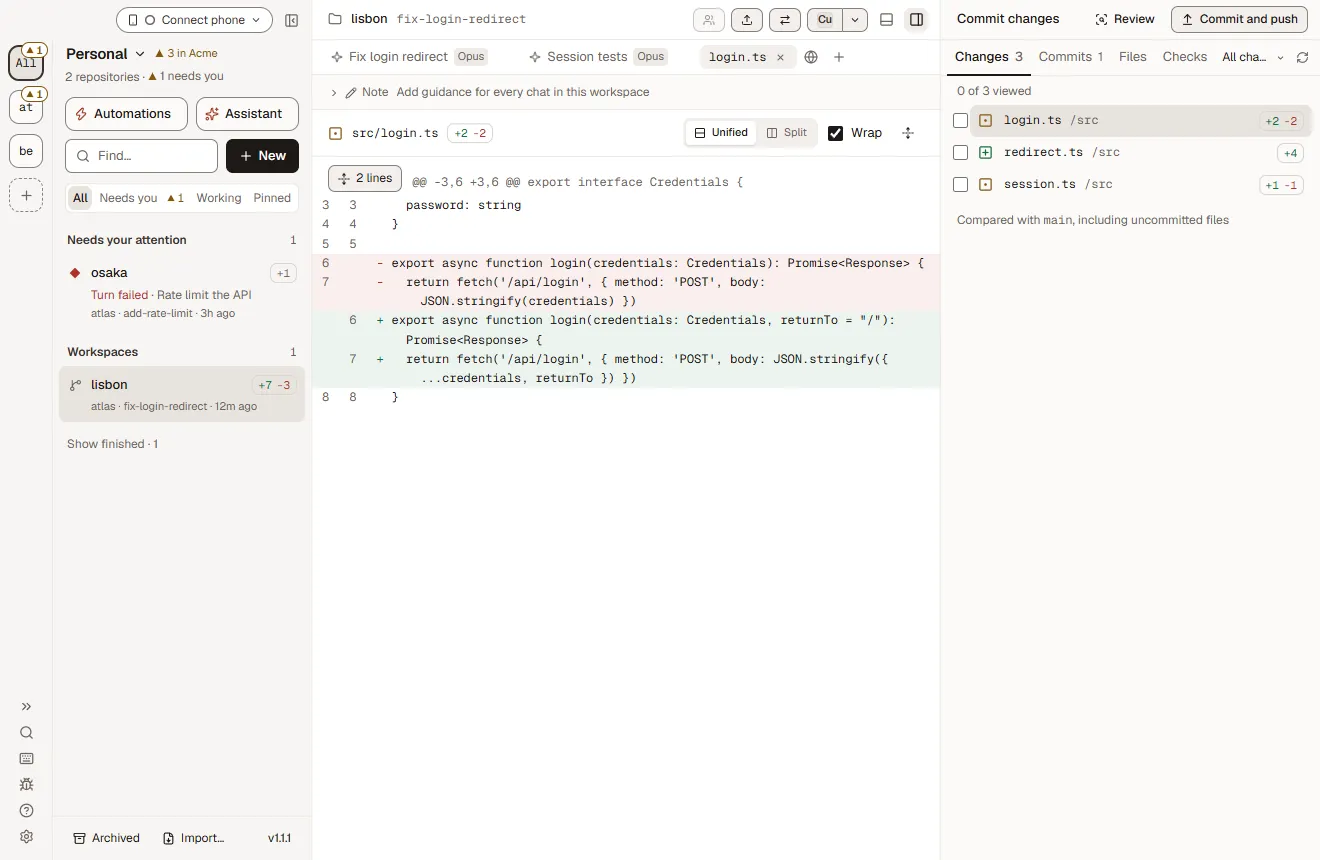
Everything around the sheets: Foreman is local-first with no account, approvals spell a command out, every change is a diff you read first, Tiles holds 10 to 12 agents, and the command line takes --json everywhere.
Detail · Command line
foreman send atlas "also add a test for an expired token"
# Follow up in the same workspace
foreman approvals
# See what is waiting for you
foreman pr create atlas --draft
# Open a draft pull request
foreman flow run fix-until-green --input task="make the tests pass" --wait
# Loop until the checks pass
- §01
Local-first. No account.
Foreman runs on your computer. There is no Foreman account, no cloud service and no telemetry upload. Agents use your own logins and API keys.
- §02
Approvals that spell it out
An approval breaks a command down part by part, marks anything that leaves your computer, and says exactly what Always allow adds.
- §03
Review every change
Read each change as a diff before you commit, push or open a pull request. Checkpoints let you rewind a workspace to any turn.
- §04
Watch them all at once
Tiles shows several workspaces side by side so you can step in where you are needed. Built for 10 to 12 agents running at once.
- §05
A real command line
Almost everything in the window works from a terminal with the foreman command. Every command takes --json and exit codes are stable, so scripts and CI can rely on them.
- §06
Agents that use Foreman too
Every workspace agent gets a foreman-app MCP server to check its status, run checks and, if you allow it, hand tasks to other agents. A Claude Code or Codex session you run yourself can sign in to Foreman over MCP.
S-002 Schedule of alternatives
How is Foreman different from Conductor and T3 Code?
Foreman is open source under Apache-2.0 and runs on Windows as well as macOS, while Conductor is a closed-source Mac app. Next to T3 Code, Foreman adds flows that loop until checks pass, AI employees with git-backed memory, schedules and a CLI where every command takes --json.
—A dash means not listed on their site
| Feature | Foreman | Conductor | T3 Code |
|---|---|---|---|
| Open source | Apache-2.0 | No | MIT |
| macOS | Yes | Yes | Yes |
| Windows | Yes | Mac only | Yes |
| One git worktree per agent | Yes | Yes | Yes |
| Agents | Claude Code, Codex, Cursor, OpenCode, any ACP agent | Claude Code, Codex, Cursor | Claude Code, Codex and more |
| Flows that loop until checks pass, with human gates | Yes | — | — |
| AI employees with git-backed memory | Yes | — | — |
| Scheduled automations and auto-fix CI | Yes | — | — |
| Your own cloud sandboxes (E2B, Daytona, Vercel, Docker) | Experimental | — | — |
| Scriptable CLI, --json on every command | Yes | — | — |
| Approve from your phone | Yes | — | Yes |
| No account, no telemetry upload | Yes | — | — |
C-001 Construction sequence
Get started in a minute
Download the app, point it at a git repository, and give each task its own workspace.
Download Foreman
Free for macOS (Apple Silicon, signed and notarized) and Windows. You need Git on your PATH.
Download ForemanAdd a repo, sign in an agent
Pick any git repository. Sign in Claude Code, Codex, Cursor or OpenCode in Settings → Agents with your own login or key.
Create workspaces
One per task, each a fresh worktree on its own branch. Watch them in Tiles, review the diff, open the PR.
foreman run fix-a-bug "the login page loops after sign-in" --repo atlas --wait# Start a workspace from a template and wait for the turn. Every command takes --json. CLI reference
RFI Requests for information
Questions developers ask
Something missing? Open an issue or read the guide.
What is Foreman?
Foreman is a free, open-source desktop app for macOS and Windows that runs AI coding agents in parallel. Claude Code, Codex, Cursor and OpenCode each work in their own git worktree on their own branch, while you review diffs, answer questions and open pull requests from one window.
Is Foreman free and open source?
Yes. Foreman is free and licensed under Apache-2.0, with the full source on GitHub at github.com/elite-build/foreman. There is no paid tier, no account and no Foreman cloud service.
Which coding agents does Foreman support?
Foreman runs Claude Code, Codex, Cursor and OpenCode, plus any agent that speaks the Agent Client Protocol (ACP). Each agent signs in with your own subscription or API key, set in Settings → Agents.
How do I run multiple Claude Code agents in parallel?
Add a git repository to Foreman and create one workspace per task. Each workspace is a separate git worktree on its own branch, so several Claude Code sessions edit the same repository at once without conflicts. Tiles shows them side by side.
Why does each agent need its own git worktree?
A git worktree is a second checkout of the same repository on a different branch. Giving each agent its own worktree means agents never overwrite each other's files, every change lands on a reviewable branch, and your main checkout stays untouched.
Does my code leave my computer?
Only through the agents you choose. Foreman runs locally with no account and no telemetry upload; your agents talk to their own model providers. In your own workspaces, an approval marks any command that leaves your computer before it runs, and AI employees hold Slack posts and Linear changes for you.
Do coding agents need my approval for every command?
Only if you want them to. Approvals are a setting: with Claude Code tool approvals on (Settings → Account), each command is spelled out part by part before it runs, anything that leaves your computer is marked, and Always allow shows exactly what it adds. Every agent still works in its own worktree, and checkpoints rewind any turn.
Which operating systems does Foreman run on?
Foreman runs on macOS (Apple Silicon, signed and notarized) and Windows. You need Git on your PATH and a login or API key for at least one agent.
Can Foreman run coding agents on a schedule?
Yes. Any saved prompt template can run hourly, daily, weekly or monthly in your time zone, and opt-in auto-fix sends failing CI logs to your agent. Scheduled runs use Claude Code and happen while Foreman is running, which can be without a window or from login.
Can I control Foreman from my phone?
Yes. Pair a phone with a QR code to answer approvals, steer agents, comment on diffs and read terminals, live. On the same Wi-Fi it connects directly, and anywhere else through your own Tailscale network. Native iOS and Android apps are coming soon.
Can coding agents run in a cloud sandbox like E2B?
Yes, as an experiment. A workspace's worktree and agent can run in a sandbox on your own E2B, Daytona, Vercel Sandbox or Docker account, for Claude Code, Codex and OpenCode. Provider keys stay on your computer and never go into the sandbox.
Which integrations does Foreman have?
GitHub (pull requests, merges, CI and reviews), GitLab, Linear, Slack and Langfuse, plus MCP. Each connection has a default per service, each repository can pick its own, and you choose what agents may do with it: nothing, read, or read and write.
How is Foreman different from Conductor?
Foreman is open source under Apache-2.0 and runs on Windows as well as macOS, while Conductor is a closed-source Mac app. Foreman also drives OpenCode and any ACP agent, and adds flows that loop until checks pass, AI employees and a scriptable command line.
How is Foreman different from T3 Code?
Both are open-source GUIs for coding agents. Foreman adds flows (agent graphs that loop until tests pass, with human gates), AI employees with a git-backed memory, a foreman CLI where every command takes --json, phone approvals and remote sandboxes.
Can I script Foreman or use it in CI?
Yes. The foreman command starts workspaces, sends messages, answers approvals, opens and merges pull requests and runs flows. Every command takes --json and exit codes are the same for every command.
Issue Approved for construction
Put your name in the title block.
Foreman is three weeks old and has shipped 31 releases since 1.0.0 on 27 October. It's drawn in the open under Apache-2.0. Star it to follow the revisions, fork it, or take a first issue and sign the drawings with us.
Revisions this visit: none yet
- AG-001Set issued for review