Claude Code
Full agent
Agent · Anthropic
The one Foreman lets work alone: schedules, flow code steps, AI employees and the assistant.
- This computer: Yes
- Sandbox: Yes
- Unattended: Yes
01/32
Collect the whole crew · 32 cards
Foreman is a free, open-source desktop app for macOS and Windows that runs AI coding agents in parallel. Claude Code, Codex, Cursor and OpenCode each work in their own git worktree on their own branch, while you review diffs, answer questions and open pull requests from one window. Every agent wears its own hat, and you pick the right one per task instead of once and for all.
Agent · Anthropic
The one Foreman lets work alone: schedules, flow code steps, AI employees and the assistant.
01/32
Abilities Claude Code
Source: docs/agents.md §12
Agent · OpenAI
Read-only inside its own sandbox, with goals, and a reviewer a flow can call on.
02/32
Abilities Codex
Source: docs/agents.md §12
Agent · Anysphere
An interactive pair in a worktree of its own. It never asks, so Foreman reviews what it does.
03/32
Abilities Cursor
Source: docs/agents.md §12
Tap a card to flip it
The rulebook
None of them wins everywhere: they have different strengths, and Foreman lets you run them side by side and pick per task. Here is what each one can do inside Foreman, from its capability record, with no benchmarks.
Reach for Claude Code when…
Reach for Codex when…
/goal.Reach for Cursor when…
All three ship inside the app, sign in with your own account or key, can keep running after you quit if you opt in, and get a git worktree each. That's why the honest answer is “more than one”.
The binder
Four full agents plus any ACP agent, ten flow personas, and an AI employee team: Priya, the program manager, and fifteen job templates. Flip any card for its abilities; drag or add agents to the compare tray under the binder.
Agent · Anthropic
The one Foreman lets work alone: schedules, flow code steps, AI employees and the assistant.
01/32
Abilities Claude Code
Source: docs/agents.md §12
Agent · OpenAI
Read-only inside its own sandbox, with goals, and a reviewer a flow can call on.
02/32
Abilities Codex
Source: docs/agents.md §12
Agent · Anysphere
An interactive pair in a worktree of its own. It never asks, so Foreman reviews what it does.
03/32
Abilities Cursor
Source: docs/agents.md §12
Agent · SST
Asks before it runs a tool, answers to Foreman, and reports what each turn cost.
04/32
Abilities OpenCode
Source: docs/agents.md §12
Agent · Agent Client Protocol
Gemini CLI, Qwen Code, Goose and eight more, through one protocol. Off until you enable them.
05/32
Abilities Any ACP agent
Source: docs/agents.md §12
Flow persona · turn
Plans the change without making it, from the task and the tree.
06/32
Abilities architect
Source: src/shared/personaStarters.ts
Flow persona · turn
Makes the change and gets the checks passing.
07/32
Abilities developer
Source: src/shared/personaStarters.ts
Flow persona · reviewer
Reviews the change against what was asked; finds problems, never fixes them.
08/32
Abilities qa-engineer
Source: src/shared/personaStarters.ts
Flow persona · reviewer
Reviews what the change looks like, from the diff and before-and-after screens.
09/32
Abilities designer
Source: src/shared/personaStarters.ts
Flow persona · turn
Decides whether and what to build, never how; writes the requirements.
10/32
Abilities product-manager
Source: src/shared/personaStarters.ts
Flow persona · turn
Turns requirements into a design specification; writes no code.
11/32
Abilities ux-designer
Source: src/shared/personaStarters.ts
Flow persona · reviewer
Reviews the change for security problems; never fixes them.
12/32
Abilities security-reviewer
Source: src/shared/personaStarters.ts
Flow persona · turn
Updates the documentation for what the diff changed; never code.
13/32
Abilities docs-writer
Source: src/shared/personaStarters.ts
Flow persona · turn
Structures and writes a research report on an idea, and revises it in place.
14/32
Abilities researcher
Source: src/shared/personaStarters.ts
Flow persona · reviewer
Reviews a research report for soundness, alone.
15/32
Abilities research-reviewer
Source: src/shared/personaStarters.ts
Employee · Program manager
Plans every project, proposes who it needs, reviews each part and accepts the result.
16/32
Abilities Priya
Source: CHANGELOG.md §1.2.0–1.2.4
Employee · Staff software engineer
Builds and fixes features, with tests, on its own branch.
17/32
Abilities Ravi
Source: src/shared/employeeTemplates.ts
Employee · Staff frontend engineer
Builds screens and components and keeps them accessible.
18/32
Abilities Mei
Source: src/shared/employeeTemplates.ts
Employee · Staff QA engineer
Reviews what others build and says what breaks.
19/32
Abilities Quinn
Source: src/shared/employeeTemplates.ts
Employee · Staff security engineer
Reviews changes and dependencies for security risks.
20/32
Abilities Omar
Source: src/shared/employeeTemplates.ts
Employee · Staff site reliability engineer
Keeps builds, deploys and services healthy.
21/32
Abilities Sofia
Source: src/shared/employeeTemplates.ts
Employee · Staff software architect
Shapes the system and reviews big changes before they start.
22/32
Abilities Kenji
Source: src/shared/employeeTemplates.ts
Employee · Staff UX designer
Reviews screens and flows, specifies what to build and draws it as mocks.
23/32
Abilities Uma
Source: src/shared/employeeTemplates.ts
Employee · Staff web designer
Designs and builds marketing and content sites.
24/32
Abilities Leo
Source: src/shared/employeeTemplates.ts
Employee · Staff product manager
Recommends what to build next and writes the requirements.
25/32
Abilities Nia
Source: src/shared/employeeTemplates.ts
Employee · Staff data analyst
Answers questions with data and specifies dashboards.
26/32
Abilities Dara
Source: src/shared/employeeTemplates.ts
Employee · Staff technical writer
Writes the docs and keeps them up to date.
27/32
Abilities Theo
Source: src/shared/employeeTemplates.ts
Employee · Staff copywriter
Writes release notes, launch posts and site copy.
28/32
Abilities Ines
Source: src/shared/employeeTemplates.ts
Employee · Staff SEO specialist
Audits the site for search and suggests fixes.
29/32
Abilities Sam
Source: src/shared/employeeTemplates.ts
Employee · Staff marketing manager
Plans launches and the messages around them.
30/32
Abilities Ana
Source: src/shared/employeeTemplates.ts
Employee · Staff support engineer
Triages issues and traces what users report in the code.
31/32
Abilities Jonah
Source: src/shared/employeeTemplates.ts
✓ yes✕ no– not stated, or a notePersona hat colours are this page's; personas don't wear one in the app.
Compare tray 3 of 3
Drag an agent card here, or tap the chips. The tray holds three.
The compare tray
In Foreman, Claude Code is the only one that runs unattended, Codex holds read-only through its sandbox and can review in a flow, and Cursor is an interactive pair that Foreman reviews. The table follows the compare tray above; with no JavaScript it shows all five.
| Ability | Claude Code | Codex | Cursor | OpenCode | Any ACP agent |
|---|---|---|---|---|---|
| Made by | Anthropic | OpenAI | Anysphere | SST | Agent Client Protocol |
| Read-only mode | Yes, through plan mode | Yes, through its sandbox | No | No | No |
| Plan mode | Yes | Yes, since 1.0.22 | No | No, until it lists one | When the agent lists one |
| Asks you questions | Yes | Yes | No | Yes | Yes |
| Tool approvals | Yes | Yes | Never asks | Yes | Yes |
| Always allow | Yes | Yes | No | Once only | Kept by Foreman for the session |
| Steer a running turn | Native | Native | Interrupt and restart | Interrupt and restart | Interrupt and restart |
| Fork and rewind the conversation | Native | Native | Fallback | Fallback | Fallback |
| Subagents as rows you can stop | Yes | No | No | No | No |
| Goals (/goal) | No | Yes | No | No | No |
| Reports cost | Yes | No | No | Yes | No |
| Usage limit windows and reset times | Yes | Yes | No | No | No |
| Unattended: schedules, flow code steps, AI employees | Yes | No | No | No | No |
| Flow steps that write code | Yes | No | No | No | No |
| Flow review and decide steps | Yes | Yes, read-only and attended | No | No | No |
| Runs the Foreman assistant | Yes | No | No | No | No |
| Remote sandboxes (E2B, Daytona, Vercel, Docker) | Yes, with a setup token or API key | Yes, with an API key | No | Yes | Yes |
| Keeps running after you quit (opt-in) | Yes | Yes | Yes | Yes | — |
| Several accounts | Yes | Yes | Yes, an API key each | — | — |
| Who enforces its permissions | The agent | The agent, by its sandbox | Foreman, by review | Foreman | Foreman |
| Tested against | Recorded traffic, 2.1.301 | Recorded traffic, 0.163.0 | Simulated fixtures | Simulated fixtures | Simulated fixtures |
From Foreman's own capability records (docs/agents.md §12, v1.2.4). “Fallback” means Foreman does it another way; “—” means the docs don't say. Foreman also runs 18 terminal agents, such as Aider and Amp, as their own CLI in a terminal tab.
Deal a loadout
Pick a job and Foreman's dealer hands you a four-card team, with why each card fits. You are always the fourth card.
The job
Loadout for fix flaky tests
Writes the fix. Flow steps that change code run on Claude Code, the one agent Foreman runs unattended.
Reads the diff read-only, inside its own sandbox. A flow’s review steps can run on Codex.
What the reviewer wears: it finds what breaks, never fixes it, and ends with findings.
Quarantine the test, keep the fix, or send it back with a note. Nothing ships before you look.
Plays as the built-in flow flaky-test-triage.
Run them side by side in Foreman, each in its own worktree.
Loadout for try one task three ways
Takes the prompt in a worktree of its own, on its own branch.
Same prompt, its own worktree and branch, so nothing collides.
Same prompt again, as an interactive pair. Foreman reviews what it does.
Read the three diffs side by side in Tiles and keep the one you like. Nothing merges by itself.
No flow needed: three workspaces, one prompt.
Run them side by side in Foreman, each in its own worktree.
Loadout for security pass before a release
Builds, then fixes until the checks pass, round after round, within the loop’s bounds.
Reads the tree first: does the change do what was asked?
Reads the same tree for injection, secrets and unsafe defaults. Any finding goes back.
Both reviews come back clean, then you look. Nothing leaves before that.
Plays as the built-in flow two-reviewers.
Run them side by side in Foreman, each in its own worktree.
Loadout for plan a whole feature
Tag @Priya in Channels. She asks her questions first, then draws the plan as a workflow.
Specifies the screens and draws two HTML mock options for each design part.
Builds it with tests on its own branch, and opens a draft PR without waiting.
Nothing starts until you approve the plan. Slack posts and Linear changes wait for you.
Plays as a project in Channels, on Claude Code.
Priya runs the parts that don’t depend on each other side by side, in one shared workspace.
On the table
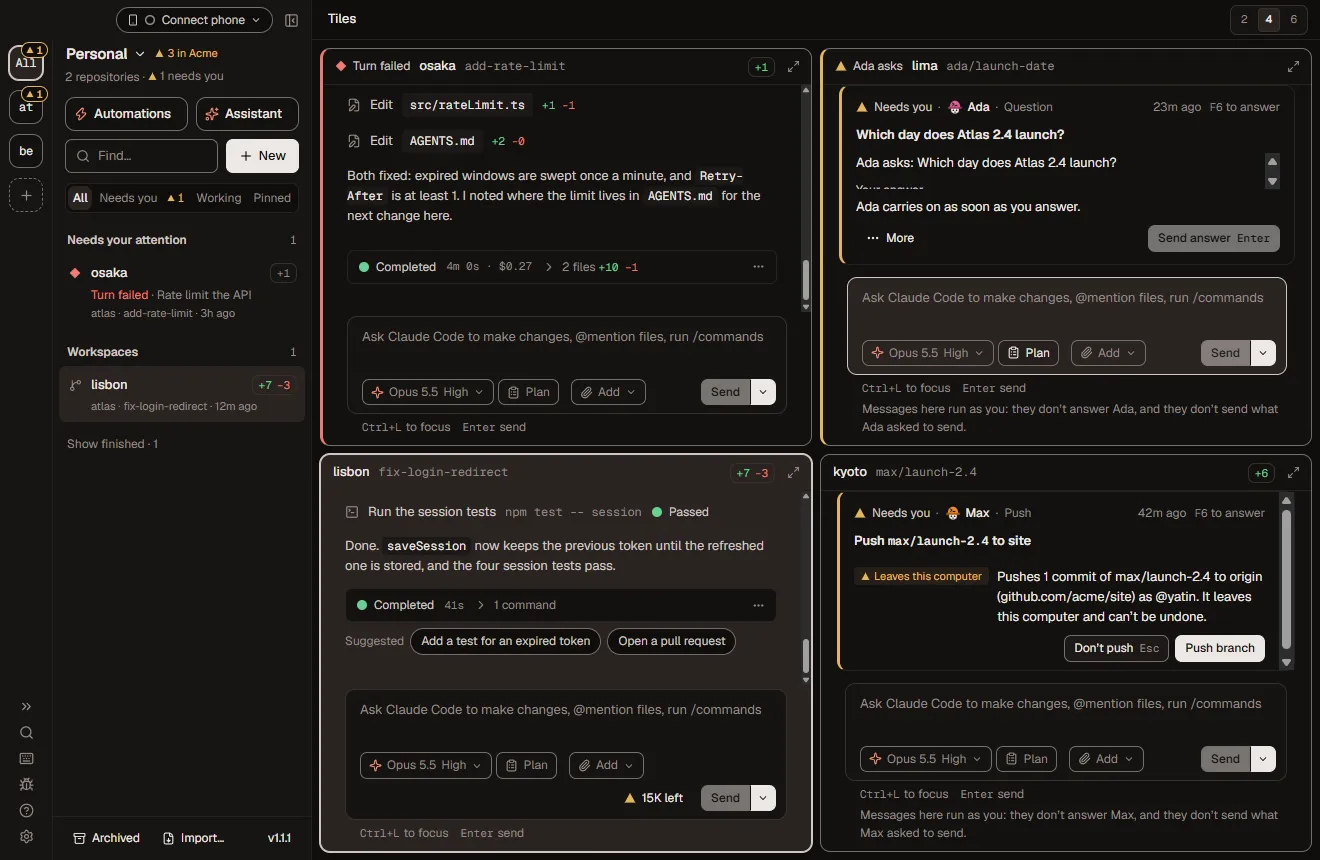
Yes. Each task gets a workspace, a git worktree on its own branch, so the agents edit the same repository at once without touching each other's files. Tiles shows them side by side, and Foreman is built and load-tested for 10 to 12 agents at once.
Booster pack
Flows that loop until the checks pass, automations and schedules, auto-fix for failing CI, remote control from your phone, integrations and remote sandboxes. All free, all in the same app.
11 built-in · experimental
Write a way of working down once as a graph of agent steps: loops that run until the checks pass or a review comes back clean, and gates where you decide.
Templates · schedules
Save prompts as templates and run them on demand or on a schedule: hourly, daily, weekly or monthly, in your time zone. Run Foreman without a window, or at login, and schedules keep going.
Opt-in · with a budget
Opt in and Foreman sends a failing CI log to your agent within a budget you set, and a read-only reviewer reads each finished diff. Checks can run after every turn, and a chat that hits a usage limit resumes by itself.
Agent access you choose
Open, merge and auto-merge pull requests, watch CI and reviews, start work from a Linear issue, send Slack notifications and read Langfuse traces. Each connection gets the agent access you choose: nothing, read, or read and write.
Experimental
Run a workspace's worktree and agent in a sandbox on your own E2B, Daytona, Vercel Sandbox or Docker account. Provider keys never enter the sandbox, and turns keep going after you close the app. Experimental.
Same Wi-Fi, or your own Tailscale
Pair a phone with a QR code to answer approvals and flow gates, steer agents and comment on diffs, live. Away from home it connects over your own Tailscale network, with no Foreman relay.
Today: pair your phone with a QR code and add the phone view to your Home Screen.
Other tables
Foreman is open source under Apache-2.0 and runs on Windows as well as macOS, while Conductor is a closed-source Mac app. Foreman also drives OpenCode and any ACP agent, and adds flows, AI employees and a CLI where every command takes --json.
—A dash means not listed on their site
| Feature | Foreman | Conductor | T3 Code |
|---|---|---|---|
| Open source | Apache-2.0 | No | MIT |
| macOS | Yes | Yes | Yes |
| Windows | Yes | Mac only | Yes |
| One git worktree per agent | Yes | Yes | Yes |
| Agents | Claude Code, Codex, Cursor, OpenCode, any ACP agent | Claude Code, Codex, Cursor | Claude Code, Codex and more |
| Flows that loop until checks pass, with human gates | Yes | — | — |
| AI employees with git-backed memory | Yes | — | — |
| Scheduled automations and auto-fix CI | Yes | — | — |
| Your own cloud sandboxes (E2B, Daytona, Vercel, Docker) | Experimental | — | — |
| Scriptable CLI, --json on every command | Yes | — | — |
| Approve from your phone | Yes | — | Yes |
| No account, no telemetry upload | Yes | — | — |
Starter deck
Download the app, add a git repository, sign in the agents you already pay for, and deal them a workspace each.
Free for macOS (Apple Silicon) and Windows. You need Git on your PATH.
Download ForemanAny git repository. Sign in Claude Code, Codex, Cursor or OpenCode in Settings → Agents, with your own login or key.
One per task, each a worktree on its own branch, each with the agent you pick. Watch them in Tiles.
foreman run fix-a-bug "the login page loops after sign-in" --repo atlas --wait# Start a workspace from a template and wait for the turn. Every command takes --json. CLI reference
Foreman is a free, open-source desktop app for macOS and Windows that runs AI coding agents in parallel. Claude Code, Codex, Cursor and OpenCode each work in their own git worktree on their own branch, while you review diffs, answer questions and open pull requests from one window.
Yes. Foreman is free and licensed under Apache-2.0, with the full source on GitHub at github.com/elite-build/foreman. There is no paid tier, no account and no Foreman cloud service.
Foreman runs Claude Code, Codex, Cursor and OpenCode, plus any agent that speaks the Agent Client Protocol (ACP). Each agent signs in with your own subscription or API key, set in Settings → Agents.
Add a git repository to Foreman and create one workspace per task. Each workspace is a separate git worktree on its own branch, so several Claude Code sessions edit the same repository at once without conflicts. Tiles shows them side by side.
A git worktree is a second checkout of the same repository on a different branch. Giving each agent its own worktree means agents never overwrite each other's files, every change lands on a reviewable branch, and your main checkout stays untouched.
Only through the agents you choose. Foreman runs locally with no account and no telemetry upload; your agents talk to their own model providers. In your own workspaces, an approval marks any command that leaves your computer before it runs, and AI employees hold Slack posts and Linear changes for you.
Only if you want them to. Approvals are a setting: with Claude Code tool approvals on (Settings → Account), each command is spelled out part by part before it runs, anything that leaves your computer is marked, and Always allow shows exactly what it adds. Every agent still works in its own worktree, and checkpoints rewind any turn.
Foreman runs on macOS (Apple Silicon, signed and notarized) and Windows. You need Git on your PATH and a login or API key for at least one agent.
Yes. Any saved prompt template can run hourly, daily, weekly or monthly in your time zone, and opt-in auto-fix sends failing CI logs to your agent. Scheduled runs use Claude Code and happen while Foreman is running, which can be without a window or from login.
Yes. Pair a phone with a QR code to answer approvals, steer agents, comment on diffs and read terminals, live. On the same Wi-Fi it connects directly, and anywhere else through your own Tailscale network. Native iOS and Android apps are coming soon.
Yes, as an experiment. A workspace's worktree and agent can run in a sandbox on your own E2B, Daytona, Vercel Sandbox or Docker account, for Claude Code, Codex and OpenCode. Provider keys stay on your computer and never go into the sandbox.
GitHub (pull requests, merges, CI and reviews), GitLab, Linear, Slack and Langfuse, plus MCP. Each connection has a default per service, each repository can pick its own, and you choose what agents may do with it: nothing, read, or read and write.
Foreman is open source under Apache-2.0 and runs on Windows as well as macOS, while Conductor is a closed-source Mac app. Foreman also drives OpenCode and any ACP agent, and adds flows that loop until checks pass, AI employees and a scriptable command line.
Both are open-source GUIs for coding agents. Foreman adds flows (agent graphs that loop until tests pass, with human gates), AI employees with a git-backed memory, a foreman CLI where every command takes --json, phone approvals and remote sandboxes.
Yes. The foreman command starts workspaces, sends messages, answers approvals, opens and merges pull requests and runs flows. Every command takes --json and exit codes are the same for every command.
Foreman is three weeks old and has shipped 31 releases since 1.0.0 on 27 October, in the open under Apache-2.0. Star it to hear about the next one, fork it, or pick up a good first issue. Your hat colour is waiting.